For third-party inspection companies

Generate inspection reports using your own Word templates.

From scheduling and mobile data collection to the final report, all in one system. Inspection data and photos flow into your report template, producing Word and PDF files.

We help configure your Word templates while keeping the report format your clients know.

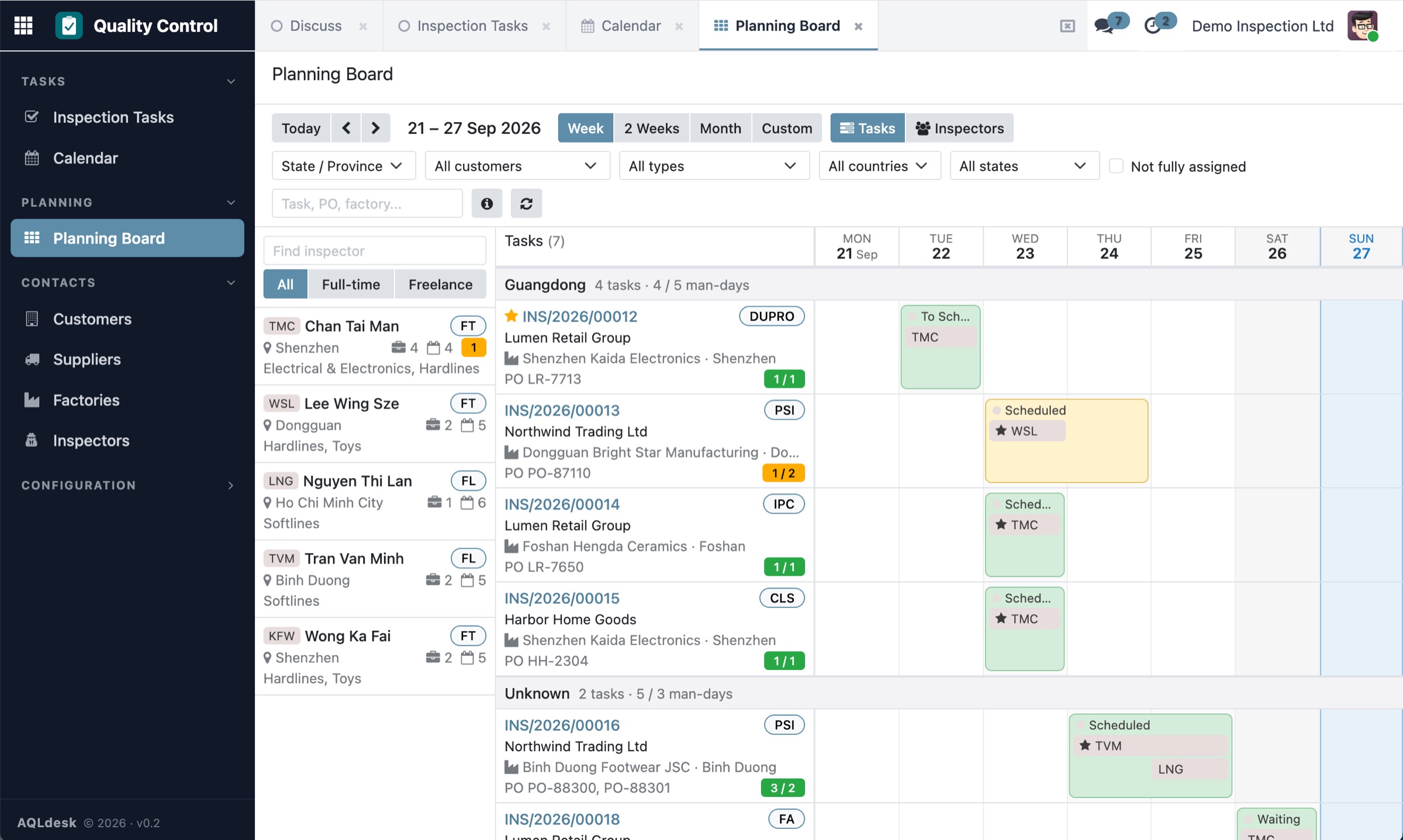
Planning board, task view: each inspection job as a bar across the week with its inspectors, grouped by province

Product demo

From scheduling to the report, in under three minutes.

See the planning board, mobile inspection forms and report generation in the deployed demo.

2 min 54 sec · Traditional Chinese + English subtitles · No audio

This video uses fictional inspection data and AI-generated example photos.

Where it comes from

Built on nearly a decade of inspection work

The core features of AQLdesk come from a system used in real inspection operations for nearly ten years, supporting scheduling, field data collection and report generation.

We bring that practical experience into AQLdesk, so third-party inspection companies can use it with their own workflows and report formats.

~10 years
original system in daily use
~1,500
inspection reports a month
100+
inspectors, full- and part-time
21
countries and regions covered

Approximate figures for the operations supported by the original system.

Business knowledge and implementation experience

AQLdesk is developed and operated by Hangzhou Joy Information Technology Consulting Co., Ltd. (杭州卓蔼信息科技咨询有限公司), based in Hangzhou, China. We provide remote services in English and Mandarin.

We have over twenty years of experience developing business management systems, including inspection management, laboratory information management (LIMS), garment manufacturing and warehousing. Years of client collaboration have given us practical experience in workflow planning, implementation and ongoing maintenance.

Sound familiar?

  • The master schedule is an Excel file that only one person dares to edit.
  • You find out an inspector is double-booked when the factory calls.
  • Reports are rebuilt in Word by hand: photos pasted one by one, sample sizes looked up in the AQL table.
  • Clients chase job status by email and WhatsApp.

Features

What AQLdesk does

Planning board

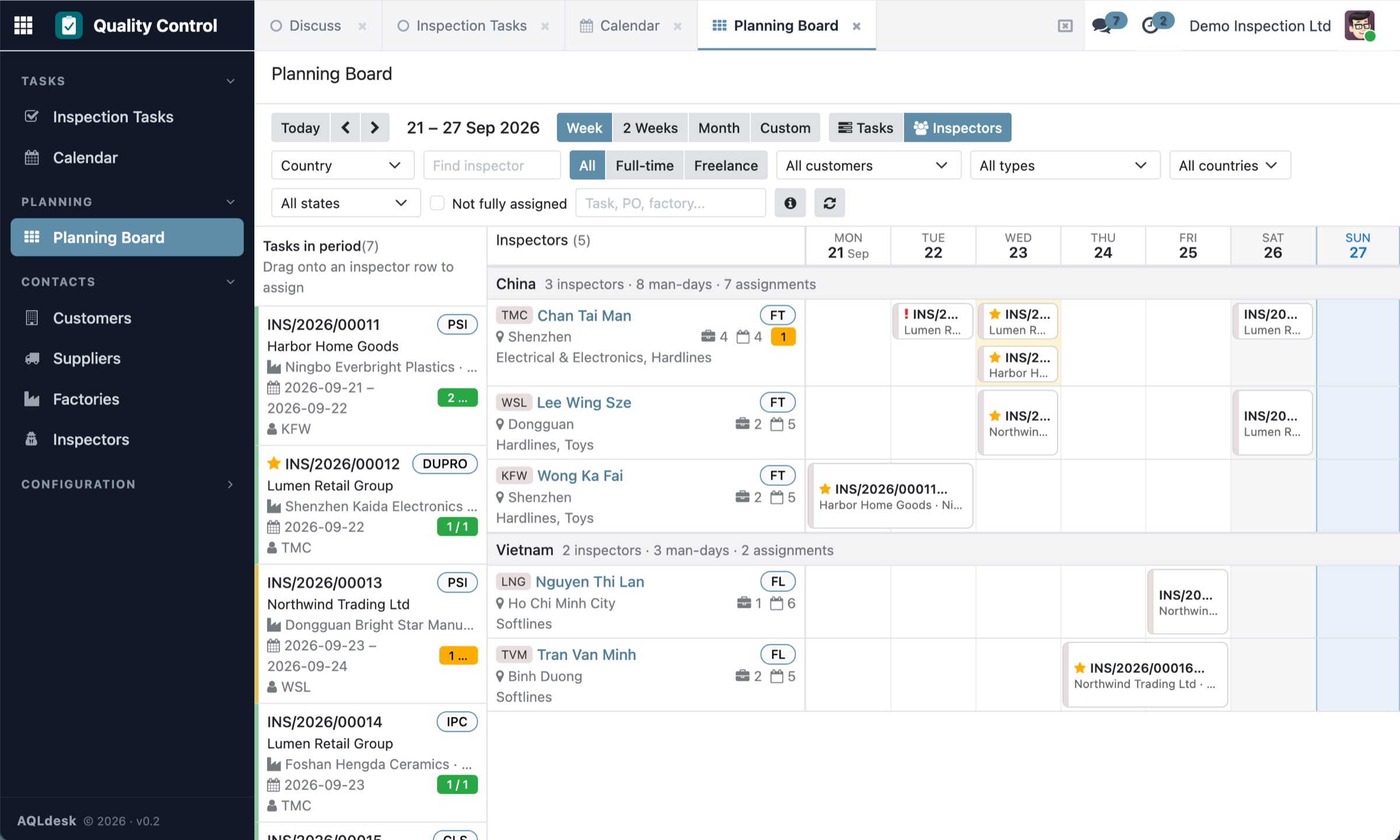
See every inspector and every job on one board. Drag an inspector onto a job and stretch it across days. Switch between week and month, or view the board by inspector to see who is free. Double bookings are flagged at once, and man-days are counted for you.

Planning board by inspector: a week of assignments, grouped by country, with unassigned jobs in the side panel

Jobs and AQL sampling

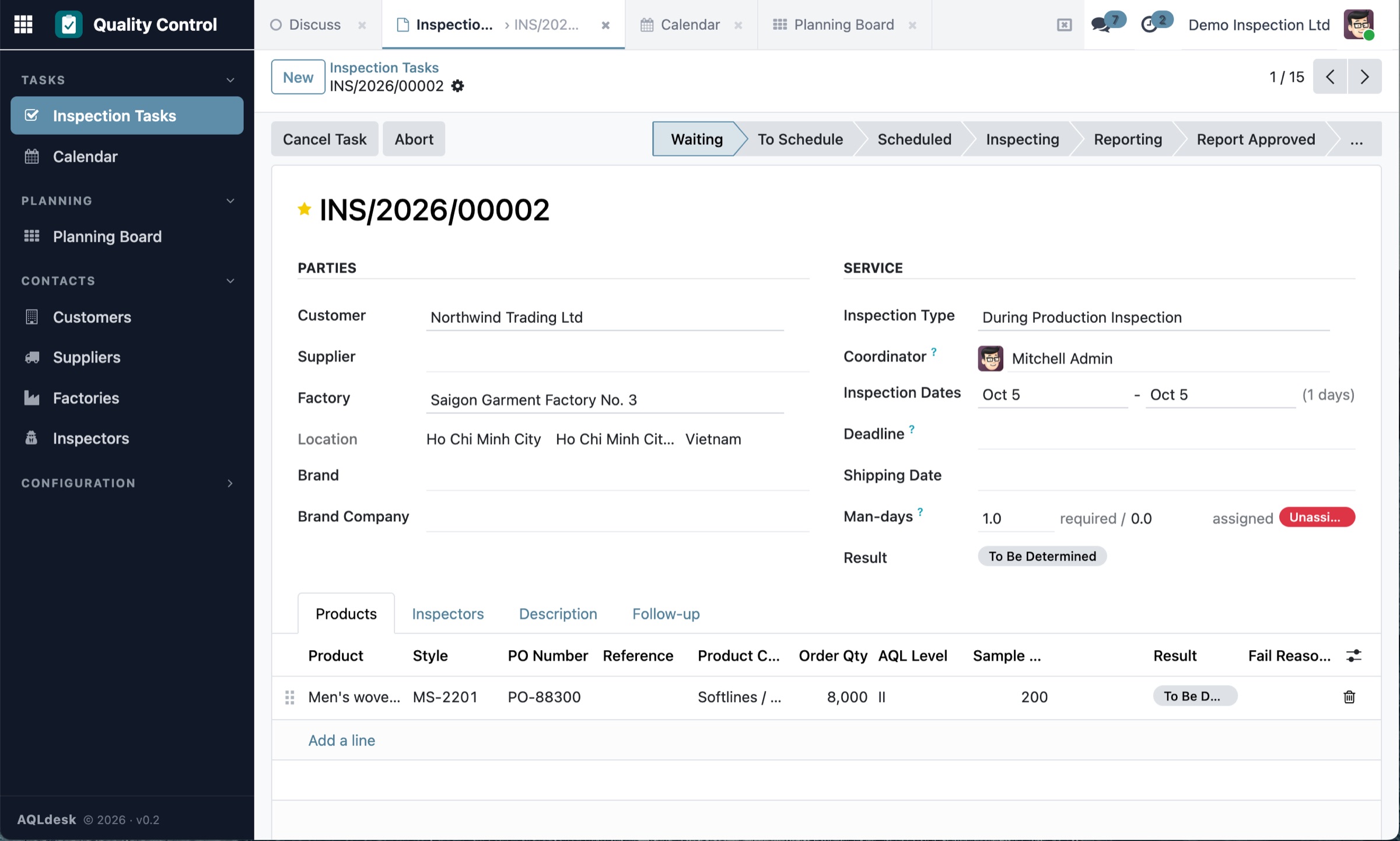
One job is one factory visit, with as many POs and products as you need. Enter the lot size and AQL, and the sample size is worked out for you. Every change is logged on the job.

Inspection job form with product lines, PO number, order quantity, AQL level and sample size

Inspector app

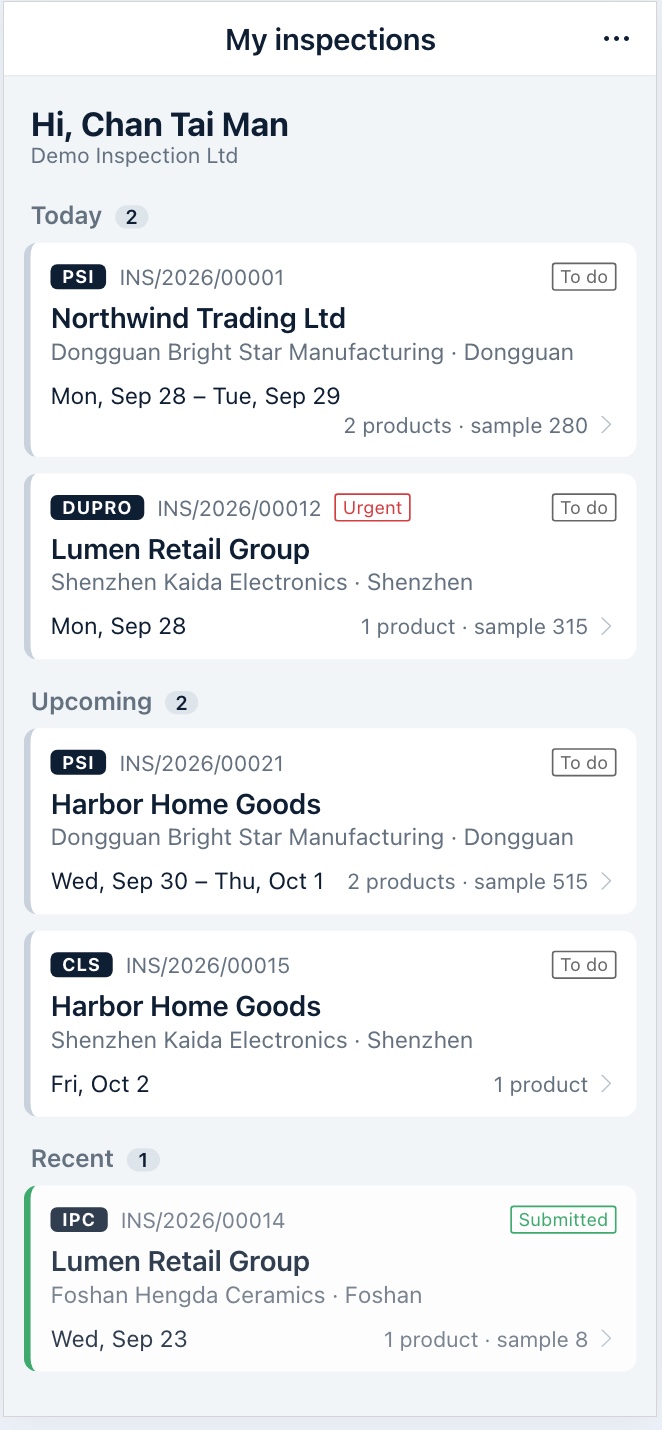
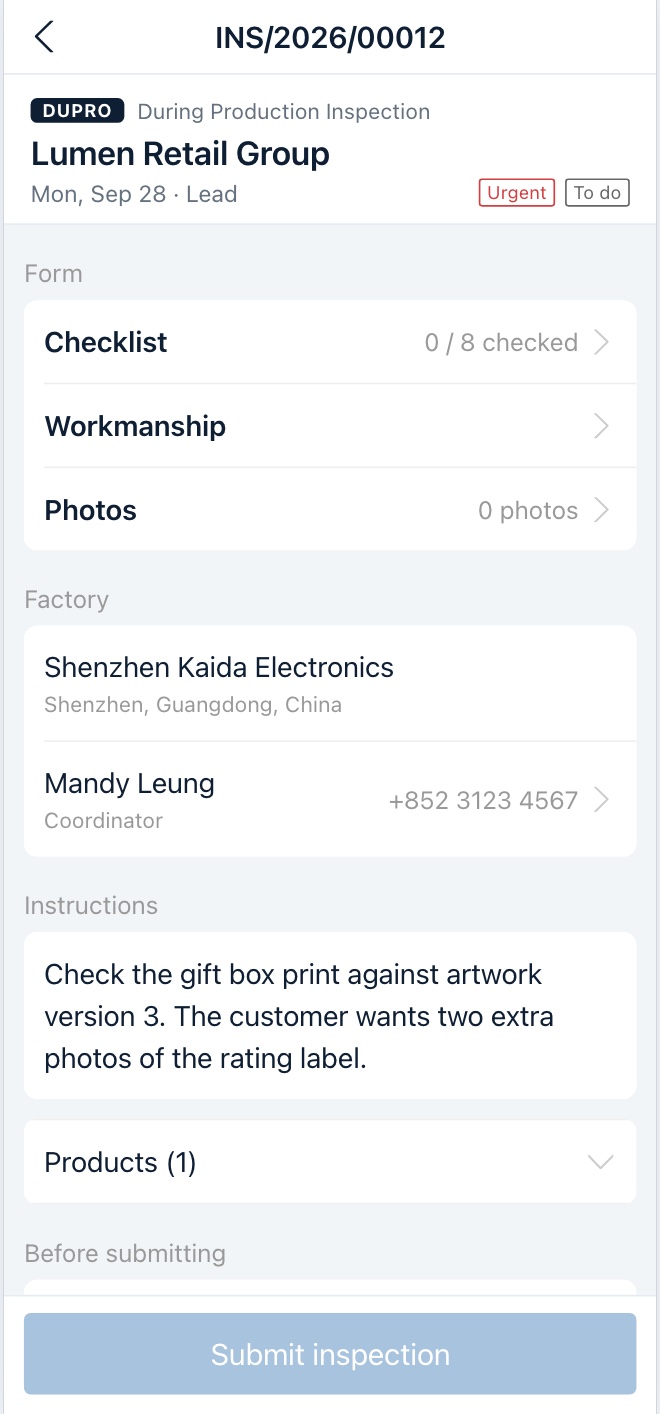
Inspectors open the day's jobs on their phone, work through the checklist, record defects and take photos. Results come back to the office as soon as they finish.

  • Today's, upcoming and recent jobs at a glance, with one tap to call the factory or the coordinator.
  • Quantities, checklist, workmanship defects, photos and conclusion, section by section.
  • Defects are judged against the AQL as they are recorded, with a suggested result for each product.
  • Photos are compressed on the phone and uploaded one by one; a failed upload can be retried.
  • Once submitted, the office can generate the report. English, Traditional and Simplified Chinese.
Inspector app on a phone: today's, upcoming and recent inspections Inspector app on a phone: one inspection with its checklist, workmanship and photos sections

Reports in your own Word template

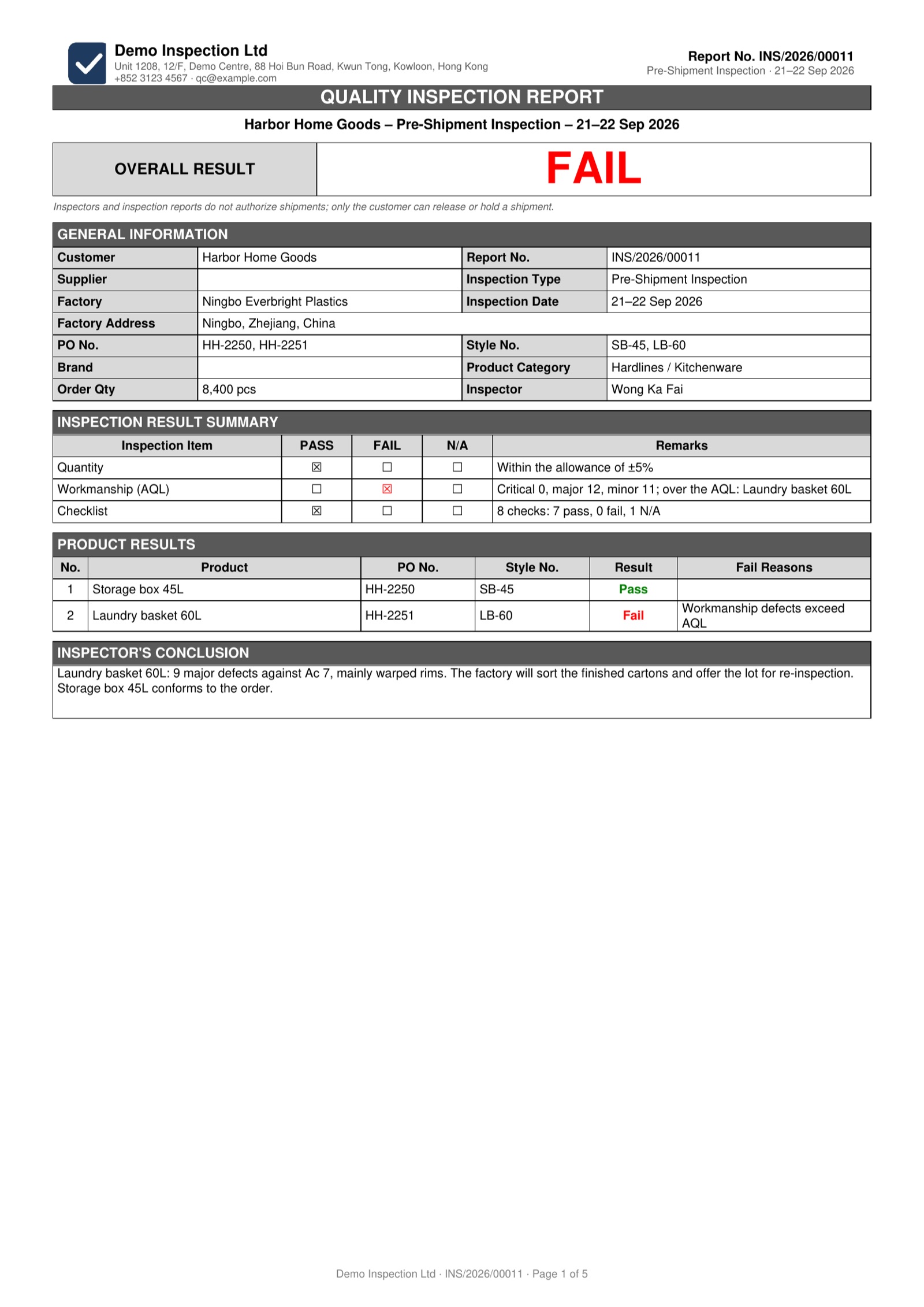
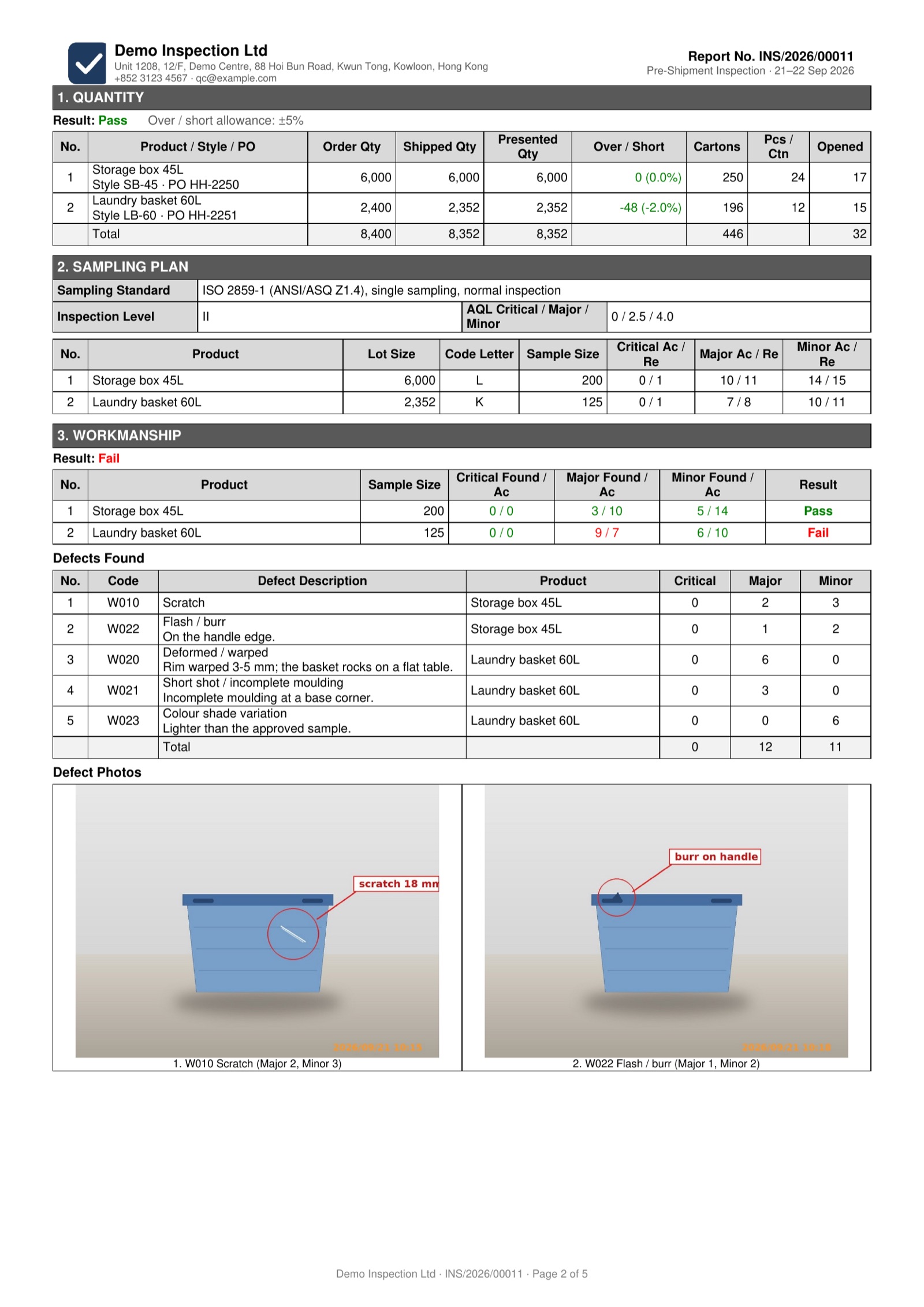
Keep the report format your clients already know. Once the inspector submits, one click fills your Word template with the job details, AQL results, defects and photos, and produces the PDF.

  • Several products in one report, each with its own quantities, sampling and result.
  • Photos laid out automatically with captions, not pasted one by one.
  • Every version is kept, and the Word file can be downloaded and edited.
  • Email the PDF to your client straight from the job, with the record kept on the job.
  • At setup, we turn your existing Word report into the template.
Sample inspection report, page 1: overall result, general information, result summary and result per product Sample inspection report, page 2: quantity, sampling plan, workmanship results, defect list and defect photos

On the roadmap

Next: client portal and AI review

The two features we build next. They are not in the product yet.

Planned

Client portal

Your clients log in themselves, instead of emailing to ask.

  • Book an inspection online; it arrives as a job for you to confirm.
  • See the progress of every job at any time.
  • Download reports once released, with past reports in one place.
  • Each client sees only its own jobs.
PO 87110 · Pre-shipment inspectionInspecting
PO 86904 · Pre-shipment inspectionReport ready
Illustration
Planned

AI review

Before a report goes out, AI reads it first.

  • Checks that quantities, sample sizes, defect counts and the conclusion agree.
  • Flags missing answers and missing photos.
  • Tidies up the English in inspectors' remarks.
  • Your reviewer only deals with what was flagged.
Sample size matches the AQL table (200 pcs)OK
11 major defects, but the conclusion says PassCheck
Illustration

The system AQLdesk comes from already has client log-in for reports and AI pre-review; we are redesigning both for AQLdesk.

Hosting

Your own system, hosted in Hong Kong

  • Each company gets its own database, not a shared account on a big platform.
  • Servers are in Hong Kong, with daily backups.
  • Your data stays yours. Export it any time.
  • English and Chinese interface.

Pricing

Simple pricing

One-time setup

We bring in your inspectors, clients and report templates.

Monthly fee

Covers hosting, backups and support.

Ask for a quote

Quoted by team size, so just ask.

See how AQLdesk fits your inspection business

Watch the product demo or request an account to explore it yourself. Contact us by email or WhatsApp to discuss report template setup, data imports and deployment.

info@aqldesk.com · WhatsApp +852 6906 2499